What is OpenClaw & Why It Matters
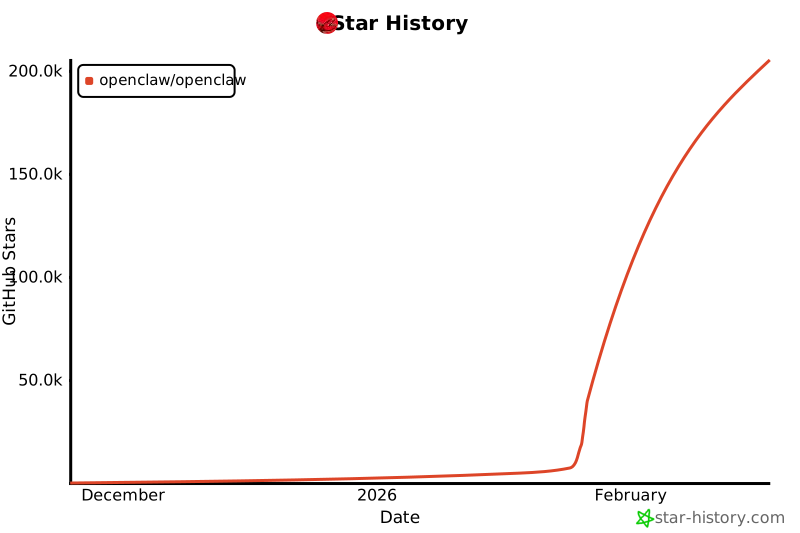
If you've been anywhere near tech Twitter, Reddit, or LinkedIn in the past few weeks, you've probably heard about OpenClaw. With over 200,000 GitHub stars and coverage from IBM, CNBC, and every major tech publication, it's the hottest thing in AI right now.
But what does that mean for you—a WordPress business owner trying to run your agency, freelance practice, or online store?
Everything.
What OpenClaw Actually Is
OpenClaw is an open-source AI agent. Think of it as ChatGPT, but it can actually do things—not just talk about them.
Writes you an email
- Writes the email
- Sends it through your email provider
- Logs it in your CRM
- Sets a follow-up reminder
- Checks if the recipient replied
- Follows up automatically if they didn't
It connects to your existing tools through simple integrations: Slack, email, Google Calendar, WordPress, your CRM—basically anything with an API or webhook.
Why 2026 is the Year of Personal Agents
For years, AI was a research project. Then it was a chatbot. Now it's a coworker.
For WordPress site owners, this is the shift from spending hours wrestling with page builders and theme settings, to just describing what you want and watching it get built.
What This Means for Your WordPress Site
The big unlock for WordPress users is OpenClaw Studio. It connects directly to your WordPress site and lets you build and manage it through natural language.
No page builder. No theme settings rabbit holes. No googling how to add a contact form. You just say what you want.
Building Pages
Describe the page and it gets built. Tell it to adjust the layout, swap the colours, change the copy. Iterate in seconds, not hours.
"Create a landing page for my photography business with a hero, portfolio gallery, and contact section"
Capturing Leads
Add a contact form that saves submissions directly into your CRM. Ask it to set up email notifications, auto-responses, or a waitlist. Done in one conversation.
"Add a waitlist form to my homepage that sends me an email and saves the contact to my CRM"
Publishing Content
Draft a blog post, give it a title and outline, have it written and published to WordPress. Set up a publishing schedule. Keep your site fresh without the time drain.
"Write a 1,000-word post about the top 5 mistakes freelancers make with client onboarding and publish it"
Monitoring Growth
Get weekly SEO reports delivered to you. Find out which pages are ranking, which keywords are close to the top, and what to write next to capture more traffic.
"Check my Google Search Console data and tell me which posts are closest to ranking on page 1"
What Used to Take Days Now Takes Minutes
The before and after is stark. Here is what building a lead capture page used to look like versus what it looks like with OpenClaw.
- 1. Choose a page builder, watch tutorials
- 2. Build the page, wrestle with spacing and mobile layout
- 3. Install a forms plugin, configure fields
- 4. Figure out how to connect it to your email list
- 5. Set up a confirmation email, test it, fix it
- 6. Add to a CRM manually, or connect yet another plugin
"Build me a lead capture page for my freelance web design service. Include a short form that collects name, email, and project type. Save submissions to my CRM and send me a Slack notification."
OpenClaw builds the page, configures the form, wires up the CRM integration, and sets up the notification. You review it, request any tweaks, and it's live.
Who This Guide Is For
This guide is for anyone who wants a website but doesn't want to spend weeks learning WordPress. It's for the social media creators who want their own corner of the web but don't know how to set it up and capture leads. It's for freelancers who want to multiply their output and build sites for clients at a blistering pace.
You might be someone who:
- Has a WordPress site but spends too long making changes that should be simple
- Wants to launch a new site without hiring a developer
- Is a freelancer or agency owner who wants to deliver client work faster
- Creates content and wants a site that works hard for you while you focus on creating
You don't need to be technical. Once you have your OpenClaw gateway set up (a few terminal commands, covered in Chapter 2), you'll be creating and editing sites through conversation.
What You'll Learn
By the end of this guide you'll know how to:
- Set up OpenClaw — Get your gateway running and connected to WordPress
- Build sites with Studio — Create pages, layouts, and themes through conversation
- Capture and manage leads — Wire up forms, a CRM, and automated follow-ups
- Create content at scale — Draft blog posts in your voice and publish directly to WordPress
- Monitor SEO and growth — Find out what's working and get actionable weekly insights
- Go further with SuperClaw — The dashboard that turns OpenClaw into a fully autonomous site assistant
Let's get started.
Ready to continue?
Get instant access to the complete guide with all chapters, workflow templates, and updates.
Get the Full Guide — $9.99One-time payment. Lifetime access and updates included.